

Embargo Publication
Use Embargo Publication when your project should be submitted and finalized now, but made publicly visible only on a future date.
With embargo, nmrXiv keeps your project fully private (identifiers and a DOI are still generated, but the data is not visible or downloadable to anyone else) until the release date you chose arrives. At that point nmrXiv publishes it automatically, no further action needed on your side.
INFO
Embargo is only available for project-level publications ("Group as one publication"). Sample-level publications ("Publish each sample on its own") are always released immediately and cannot be embargoed. See Publication Deposition for the difference between the two modes.
When to Choose Embargo Publication
Choose Embargo instead of an immediate public release when:
- your data supports a manuscript, thesis, or preprint that is still under review or not yet published, and you want to reserve a citable DOI for it now,
- a journal, funder, or institution requires a fixed public release date rather than immediate publication,
- you want your submission fully finalized, validated, and DOI-assigned today, but the actual public availability tied to a specific future date (e.g. an article's publication date or an agreed release window).
Choose immediate (public) release instead when your manuscript/thesis is already published and there is no reason to delay public access to the data.
WARNING
Embargo only delays public visibility - it does not delay validation, identifier/DOI assignment, or finalization. Once submitted, your project, samples, and datasets are locked in as described below, exactly as they would be for an immediate release. Make sure everything is correct before submitting.
What You Can and Cannot Edit
Submitting with embargo finalizes your samples, datasets, and files right away - only the public visibility is delayed. In short:
You can still edit (until the project is public):
- project title, description, keywords, organism information,
- authors, citations and funding references (including adding a missing citation DOI),
- license,
- the scheduled release date, or release the project early with Publish Now.
Locked as soon as you submit (embargoed or not):
- sample (study) details - name, description, keywords, structure/composition,
- spectra information - NMRium processing, peak picking, and assignments,
- dataset/assay metadata - technique, solvent, reference, temperature,
- files - no new files can be added, and existing files cannot be deleted.
See What You Can Still Edit and What Is Locked Once You Submit below for full details.
Where This Fits in the Submission Flow
Embargo is chosen in Step 3 - Publish Data of the Publication Deposition workflow, right after you have entered the project metadata (name, description, keywords, citations, authors, license).
Step 1 - Choose Embargo and a Release Date
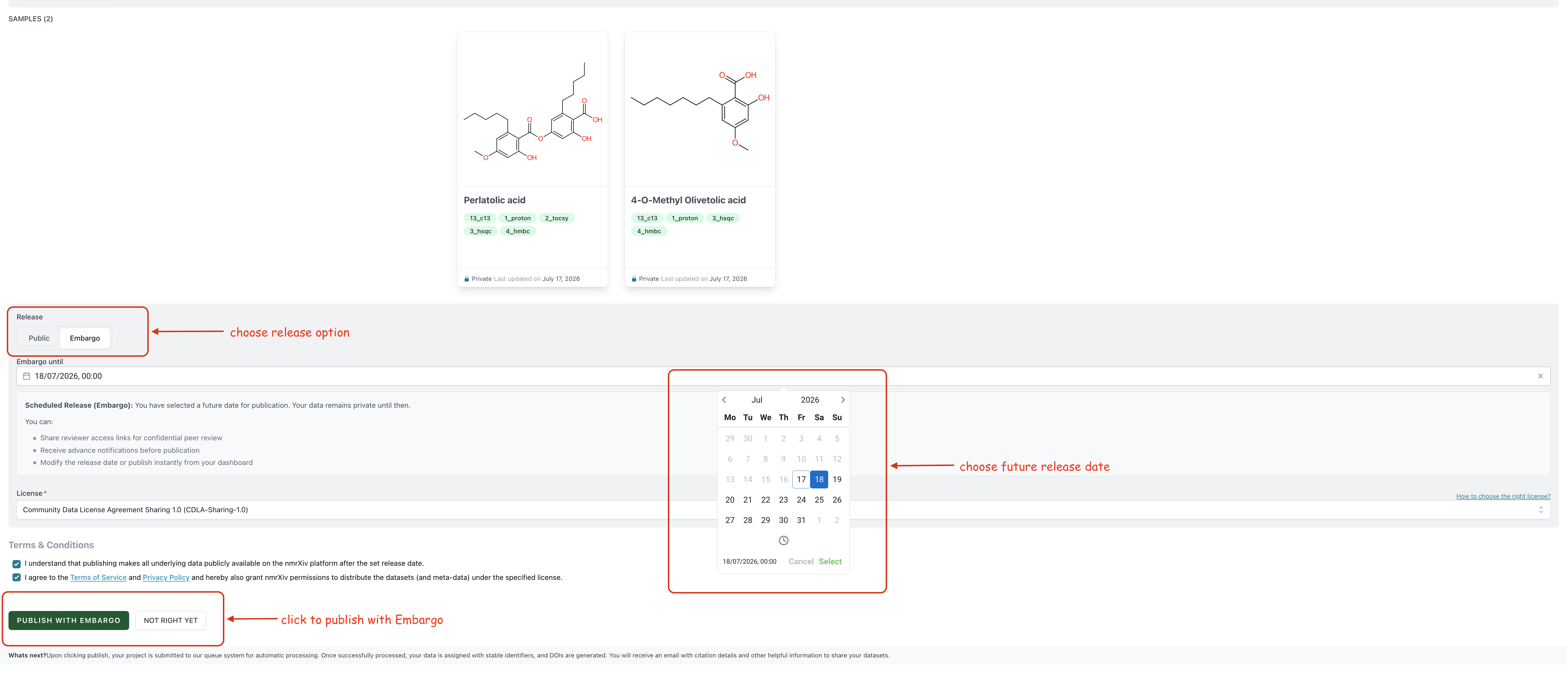
On the publish screen, use the Release toggle to choose between Public (publish immediately) and Embargo (publish later).
When Embargo is selected:
- an Embargo until date/time picker appears - pick any date in the future,
- an info box explains what scheduled release means and what you can still do while the project is embargoed,
- you must confirm the Terms & Conditions checkboxes before submitting,
- click Publish with Embargo to submit (or Not right yet to keep working on the draft).
INFO
While the release date is in the future, all validation rules apply as usual except citation DOIs - those are not required until the release date is today or in the past. This lets you submit and schedule a release even if the associated manuscript's DOI is not yet available. See Validation Rules below for the full list of requirements.
What Happens After You Submit
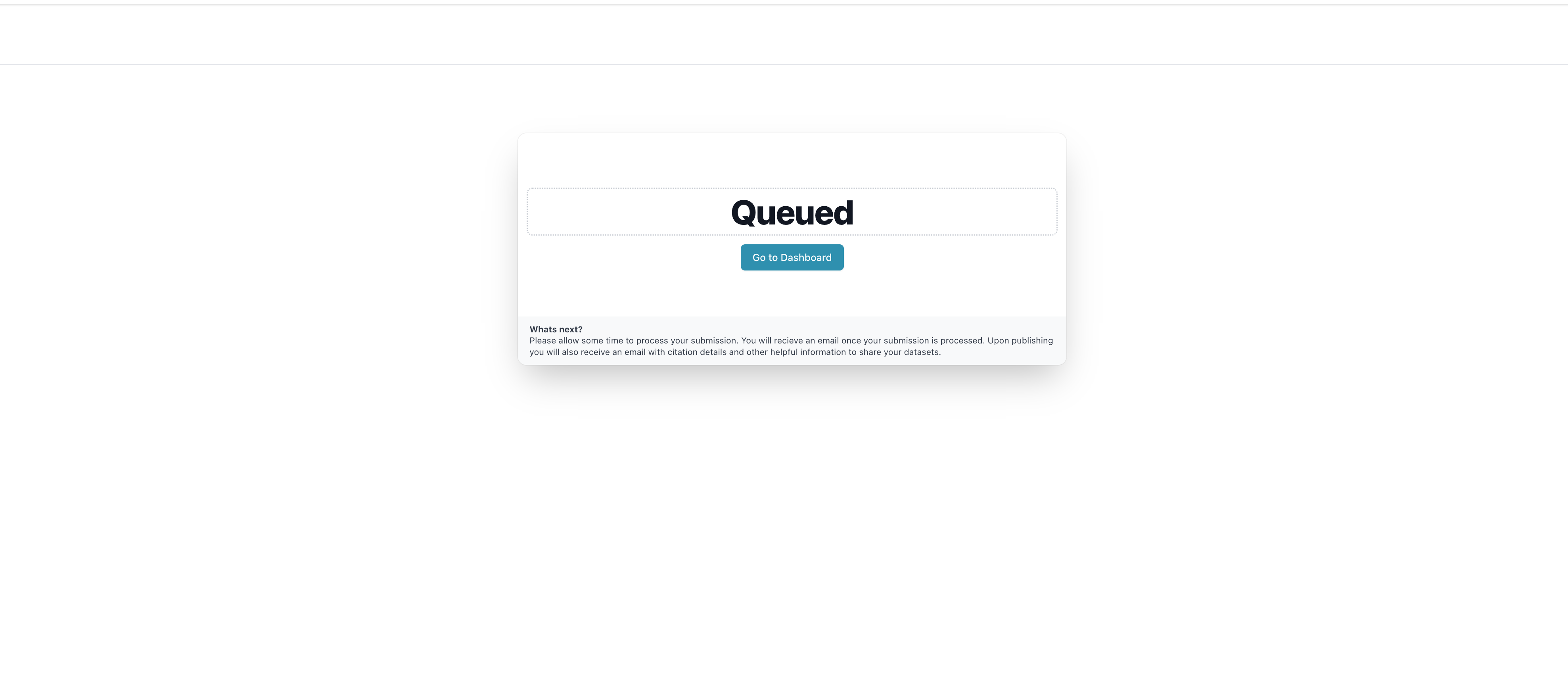
Once you submit, the project is queued and you land on a confirmation screen while it is processed in the background.
Behind the scenes, nmrXiv:
- moves the queued project through processing (
ProcessSubmissionjob), - compares the chosen release date to the current time:
- if the release date is today or earlier, the project is published immediately,
- if the release date is in the future, the project's status is set to
embargoand the record stays private,
- assigns nmrXiv identifiers to the project, its studies, and its datasets,
- generates/updates DOI metadata for the project and links any provisional DOI reserved earlier,
- rebuilds the downloadable archive files,
- sends you a confirmation notification email.
An embargoed project is fully identified (it has nmrXiv identifiers and a DOI) but remains private - it will not show up in search, browsing, or public listings until it is released.
Managing an Embargoed Project
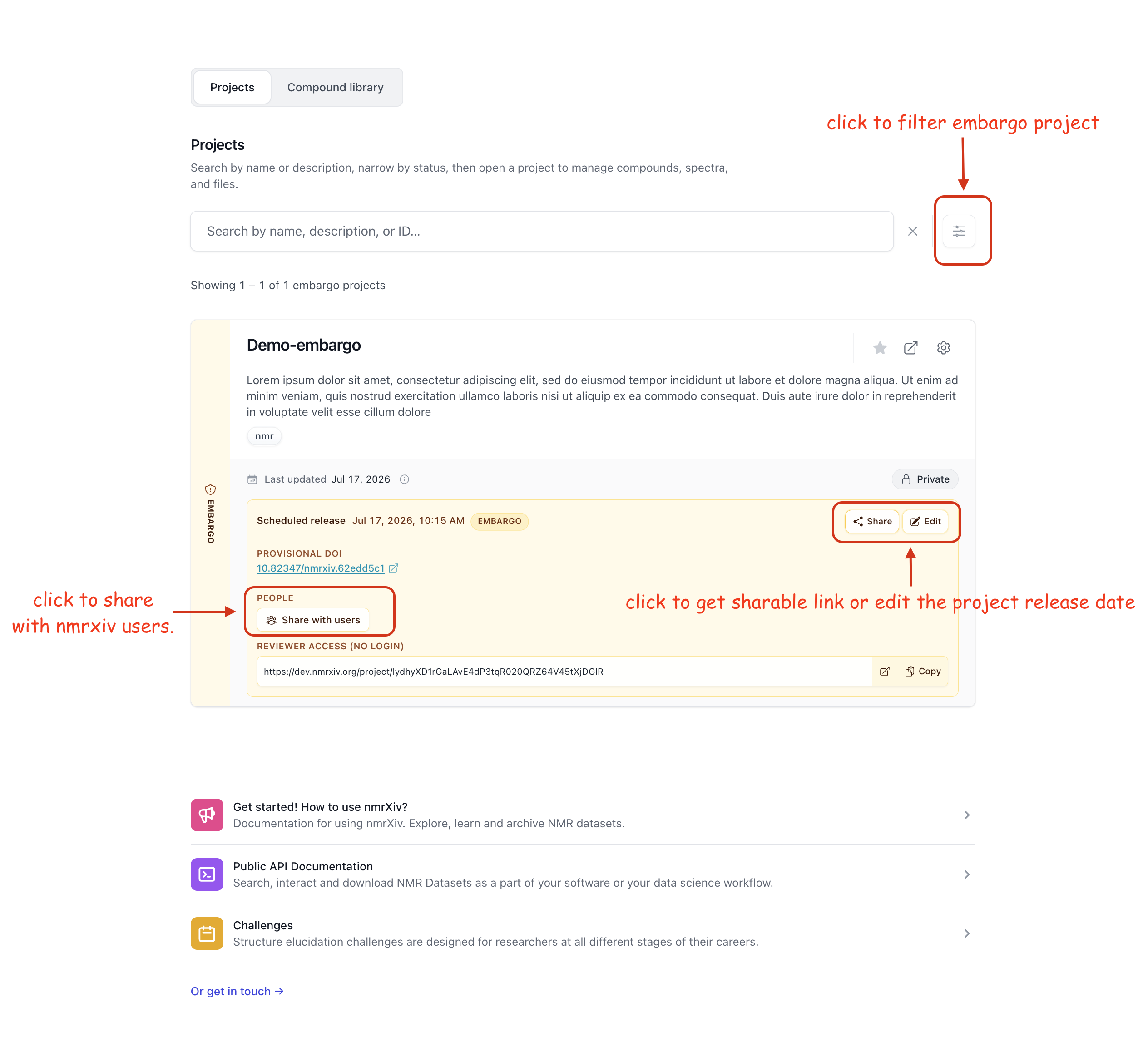
Embargoed projects are visible to their owner and collaborators from the dashboard, marked with an Embargo status badge, and can still be shared with reviewers or edited like a normal private project.
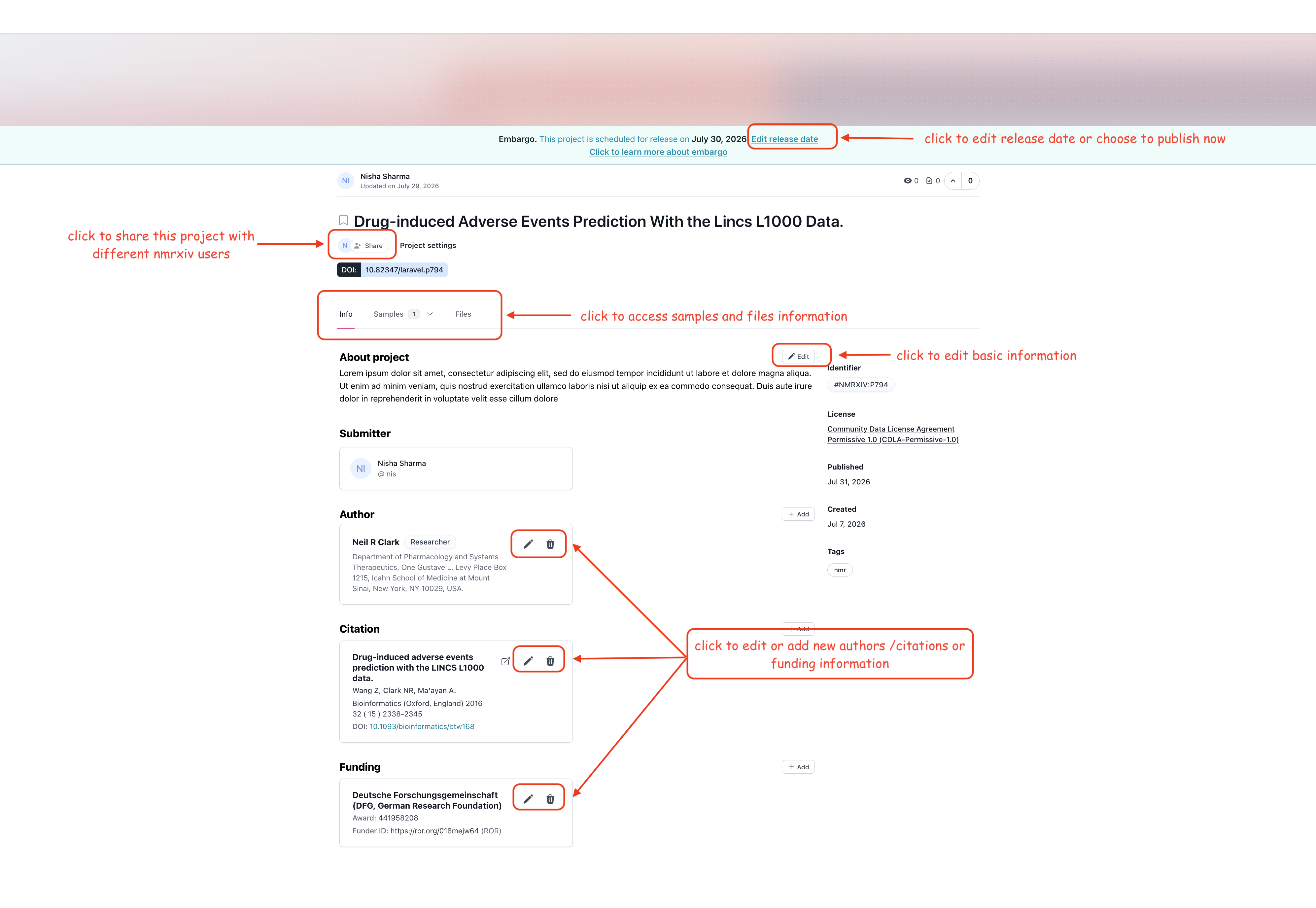
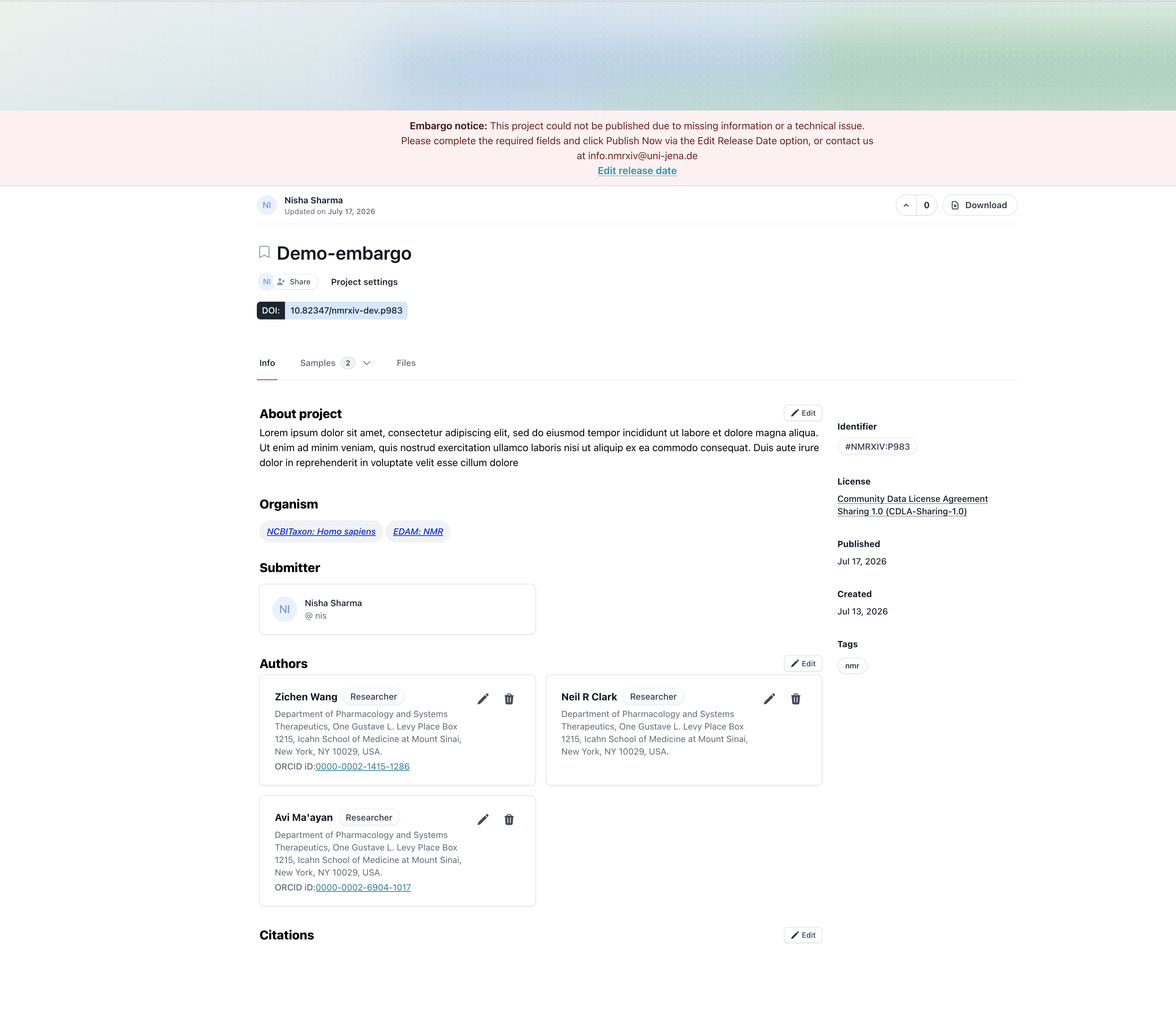
On the project page itself, an Embargo banner shows the scheduled release date and an Edit release date link.
What You Can Still Edit
While a project is embargoed, you can still:
- share reviewer access links for confidential peer review,
- edit project-level metadata: project title, description, keywords, organism information, authors, citations, funding references (including adding a missing citation DOI), and license,
- change the scheduled release date - move it earlier, later, or release immediately with Publish Now.
What Is Locked Once You Submit
nmrXiv assigns permanent identifiers and DOIs to every sample and dataset as soon as your submission is processed - even during an embargo, before the project is public. To keep those identifiers meaningful and citable, the underlying scientific content they describe is frozen from that point on. This means the following can no longer be changed, whether the project is embargoed or already public:
- sample (study) details - name, description, keywords, chemical structure/composition,
- spectra information - NMRium processing state, peak picking, and atom/peak assignments,
- dataset/assay metadata - technique, solvent, reference, temperature,
- raw or processed NMR files - no new files can be added to a sample, and existing files cannot be deleted.
If you spot an error in a sample, dataset, or file after submission, contact us at info.nmrxiv@uni-jena.de rather than trying to edit it directly.
DANGER
Once a project becomes public (automatically on the release date, or manually via Publish Now), it can no longer be reverted to private or embargoed. Review your metadata carefully before the release date arrives.
Editing the Release Date
Click Edit release date to open the release date dialog. Pick a new date/time, confirm the terms, and choose:
- Update Release Date - keeps the project embargoed and simply reschedules the automatic release, or
- Publish Now - releases the project immediately (see Manual Early Release below).
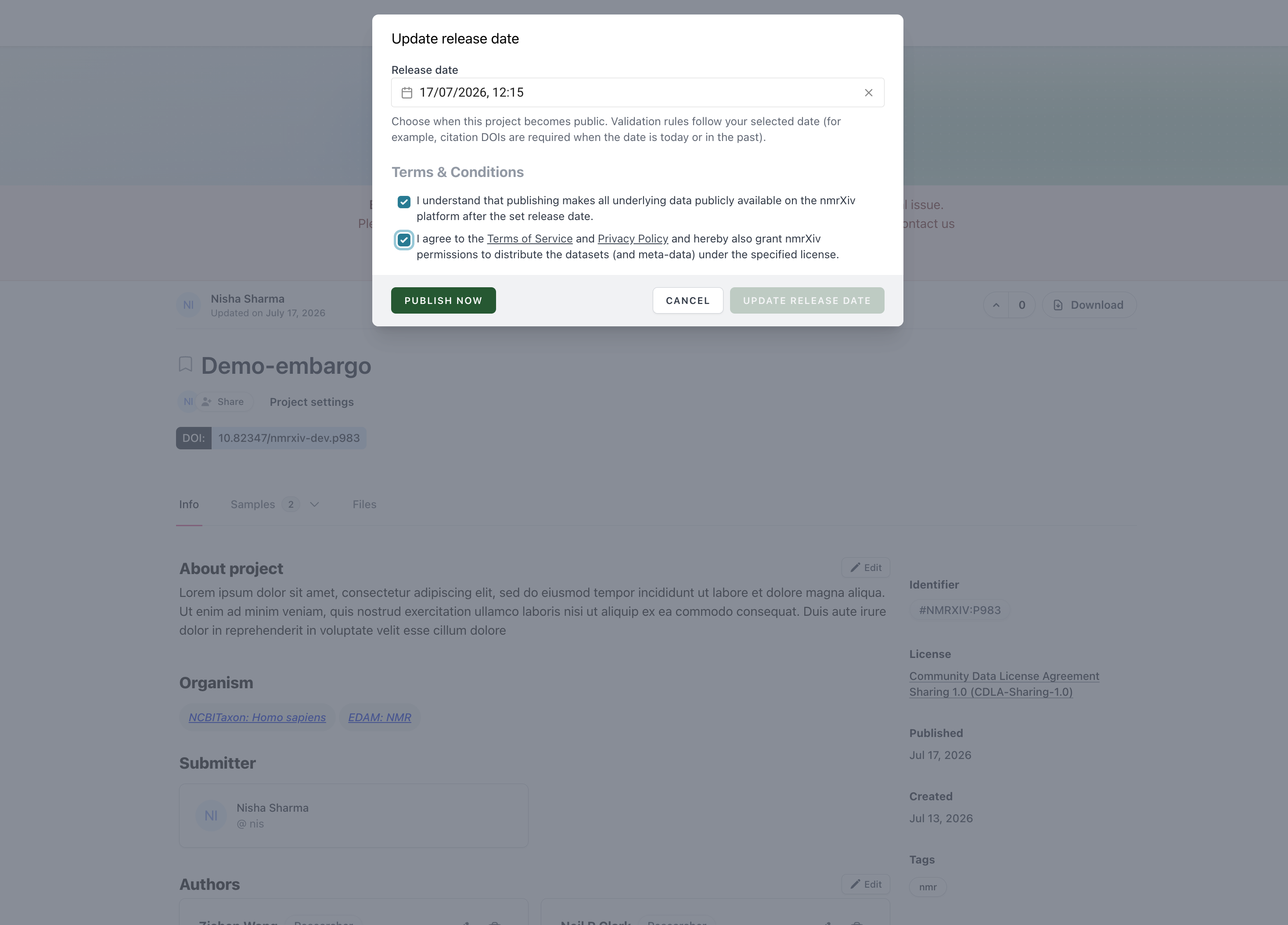
Changing the release date re-evaluates validation against the new date. In particular, moving the date to today (or earlier) immediately turns on the citation-DOI requirement, so make sure your citation DOIs are filled in first if you are trying to release soon.
Automatic Release
nmrXiv checks embargoed projects once a day and automatically publishes any project whose release date has arrived - you don't need to take any action.
WARNING
Because this check only runs once a day, your project becomes public the next time nmrXiv checks on or after your release date - it is not published the exact minute the date arrives.
Reminder Notifications Before Release
nmrXiv emails the project owner 7 days, 3 days, and 1 day before the scheduled release date, reminding them that the project is about to go public.
Manual Early Release ("Publish Now")
If you don't want to wait for the scheduled date, project owners (or team admins with edit rights) can release an embargoed project immediately using Publish Now from the release date dialog.
Before releasing, nmrXiv checks that the project:
- is not already public,
- is not archived,
- has a
statusofembargo, - has a DOI assigned.
If all of those pass, nmrXiv re-runs the full validation and publication logic exactly as it would for the automatic release (see Validation & Failure Behavior). If validation passes, the release date is set to today, the project status changes to queued, and it is published (immediately if there is no pending draft, or via a background job if there is).
Validation and Failure Behavior
Before any release - automatic (scheduler) or manual (Publish Now) - nmrXiv re-validates the entire project against the publication requirements. This is the same validation engine used during submission, so a project that passed validation when it was first submitted can still fail later if required data was removed, or if the release date changes what is required (e.g. citation DOIs).
If validation fails:
- the release is blocked - the project stays in
embargostatus and private, - for the automatic (scheduler) path, the release date is restored to its original value so the project is not accidentally left without a scheduled date,
- the project owner and all super-admins receive a failure notification email explaining what is missing,
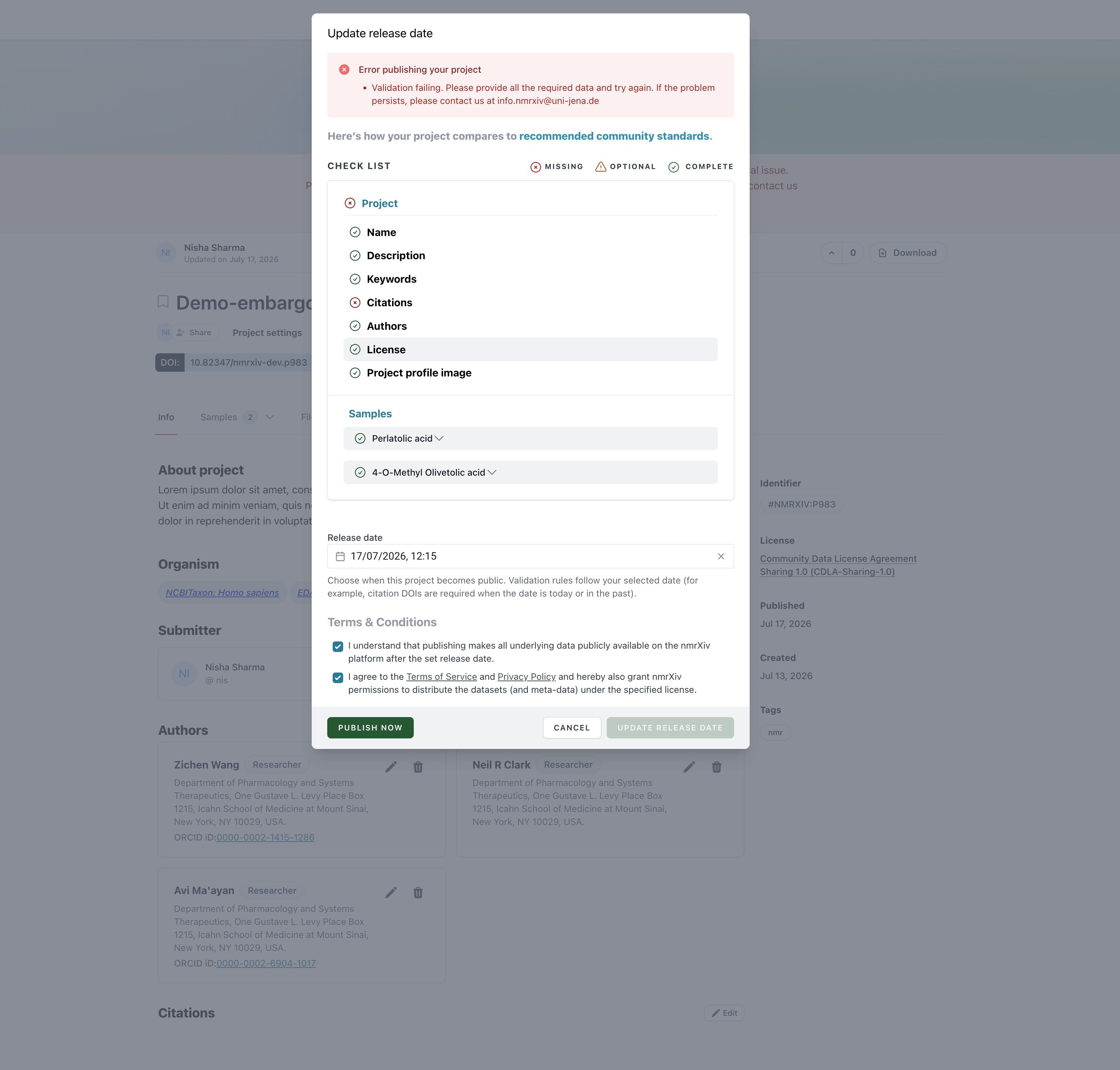
- the project page shows an Embargo notice banner explaining that publication failed due to missing information or a technical issue, with a shortcut back to Edit release date.
Reopening the release date dialog after a failure shows the validation checklist inline, so you can see exactly which fields are still missing before trying Publish Now again.
Validation Rules
nmrXiv validates three levels of the project - project, study (sample), and dataset - plus the project's citations. The exact rule set is versioned (schema_version); the rules below are the current (beta) schema.
Project-level rules
| Field | Rule | Notes |
|---|---|---|
| Title | required | Project name. |
| Description | required, min:20 | At least 20 characters. |
| Keywords | required | At least one tag. |
| Citations | array, min:1 | At least one citation entry attached. |
| Authors | required, array, min:1 | At least one author. |
| License | required | A license must be selected. |
Study (sample) rules
| Field | Rule | Notes |
|---|---|---|
| Title | required | Sample name. |
| Description | - | Not required. |
| NMRium info | required | The sample must have processed NMRium data. |
| Keywords | array, min:1 | At least one tag. |
| Molecules / composition | required, array, min:1 | At least one chemical structure linked to the sample. |
| Sample | required | The sample record itself must exist and be complete. |
Dataset rules
| Field | Rule | Notes |
|---|---|---|
| Files | required | The dataset must resolve to a supported instrument/file type. |
| NMRium info | - | Not required. |
| Assay | - | Not required. |
| Assignments | array, min:1 | At least one saved atom/peak assignment, or a pasted ACS-style assignment string. |
Citation DOI rule
Citations always require at least one entry, but the DOI on each citation is only enforced conditionally:
- Enforced when the project's release date is today or in the past - i.e. right before an immediate or embargoed-but-due release.
- Not enforced while the release date is still in the future (during an active embargo), so you can schedule a release before the associated manuscript's DOI is minted.
Sample-mode exception (no embargo)
Projects submitted as "Publish each sample on its own" always use an immediate release date and skip embargo entirely.
Reminder & Failure Notifications Summary
| Event | Recipient(s) | Trigger |
|---|---|---|
| Release reminder (7 / 3 / 1 day before) | Project owner | Daily scheduler, once per project per day-count, never repeated |
| Publication failure | Project owner + all super-admins | Automatic release attempt fails validation, or throws an unexpected error |
Important Notes
WARNING
Embargo publication is still a full publication workflow. Complete all required publication metadata (title, description, keywords, authors, license, citations) before scheduling a release - only the citation DOI requirement is deferred until the release date arrives.
WARNING
Automatic release is scheduler-driven and runs daily, so publication occurs the next time the scheduler processes eligible records on or after your release date.
DANGER
Once public release is completed - automatically or via Publish Now - the record is no longer private and cannot be reverted to embargo or draft.
INFO
Need the full publication workflow context first? See Publication Deposition.