

Submit from Chemotion
If you work with the Chemotion Repository, you can publish your NMR data in nmrXiv directly from there, without uploading anything by hand. This page explains what you need, what happens after you submit, and what to check if something does not work.
INFO
This page is part of Submit from ELN. Samples that arrive from Chemotion are published as individual samples ("Publish each sample on its own"), not as a project. See Publication Deposition for the difference.
New to the Chemotion Repository?
To learn more about the Chemotion Repository, see the Chemotion Repository documentation.
Data from your own Chemotion ELN
Data from an individual Chemotion ELN instance can be synced to the Chemotion Repository by clicking Sync data to chemotion-repo. Once it is published in the Chemotion Repository, it is sent to nmrXiv as described below.
Before You Submit
1. An nmrXiv account and a connection token
You need a registered nmrXiv account. Your submission is created under this account, it appears in your dashboard, and all emails about it are sent to the address of this account. If you do not have one yet, you can create it directly from Chemotion (see the next section) or follow Registration and Account.
You also need to connect your Chemotion account to nmrXiv once. This creates a token that allows Chemotion to send your published data to your nmrXiv account.
2. Your data in Chemotion
Your sample in Chemotion should include:
- a sample with its molecule (structure),
- at least one processed NMR analysis (spectrum) for that sample,
- the authors of the publication.
3. Optional information
The following are not required, but they make your sample easier to find and cite:
| Information | What happens if you leave it out |
|---|---|
| License | nmrXiv applies the default license, CC BY 4.0. |
| Description | The sample is published without a description. |
| Citations | The sample is published without a related publication. You can still cite your data with its DOI. |
Choosing a license
nmrXiv needs a license for every public sample. If you want a license other than CC BY 4.0, select it in Chemotion before you submit. See Licenses for the options we recommend.
Connect Chemotion to nmrXiv
You only have to do this once. After that, everything you publish in Chemotion is sent to nmrXiv automatically.
Step 1. Open External Tokens
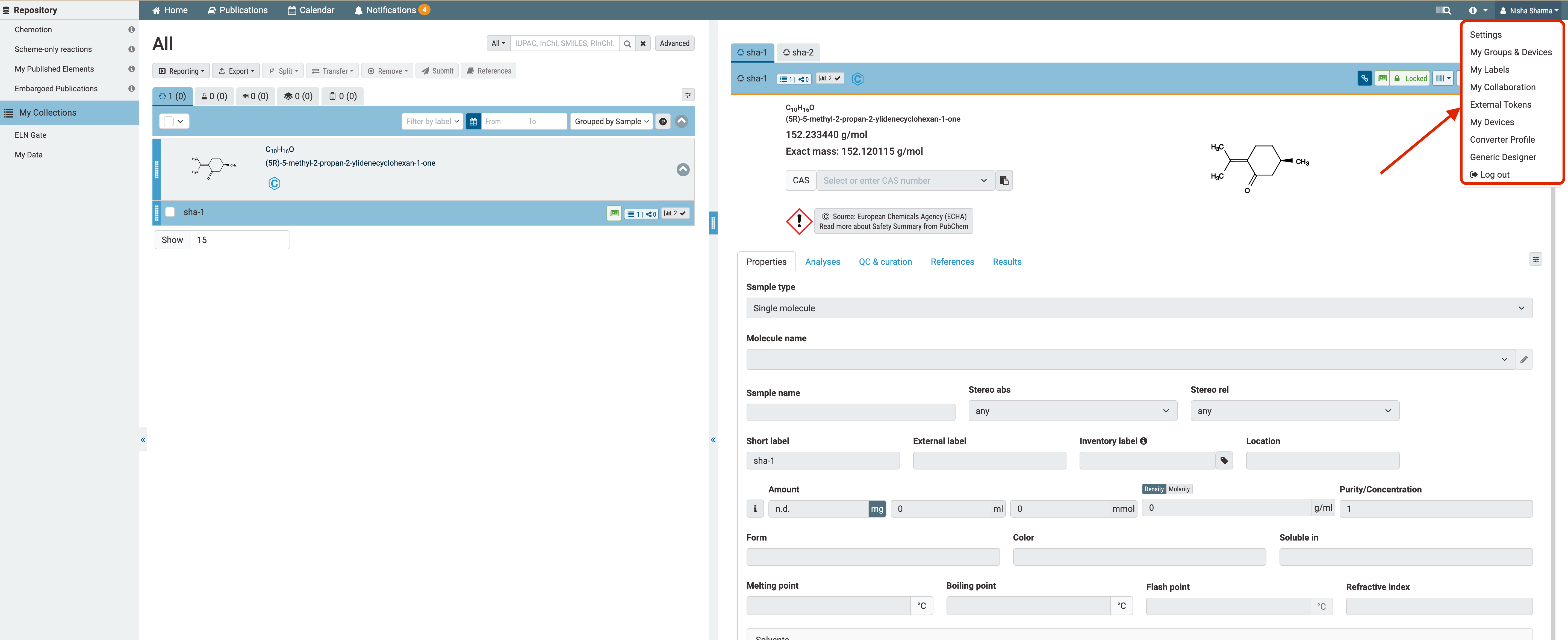
Log in to the Chemotion Repository, click your name in the top right corner and select External Tokens.
Step 2. Log in to nmrXiv
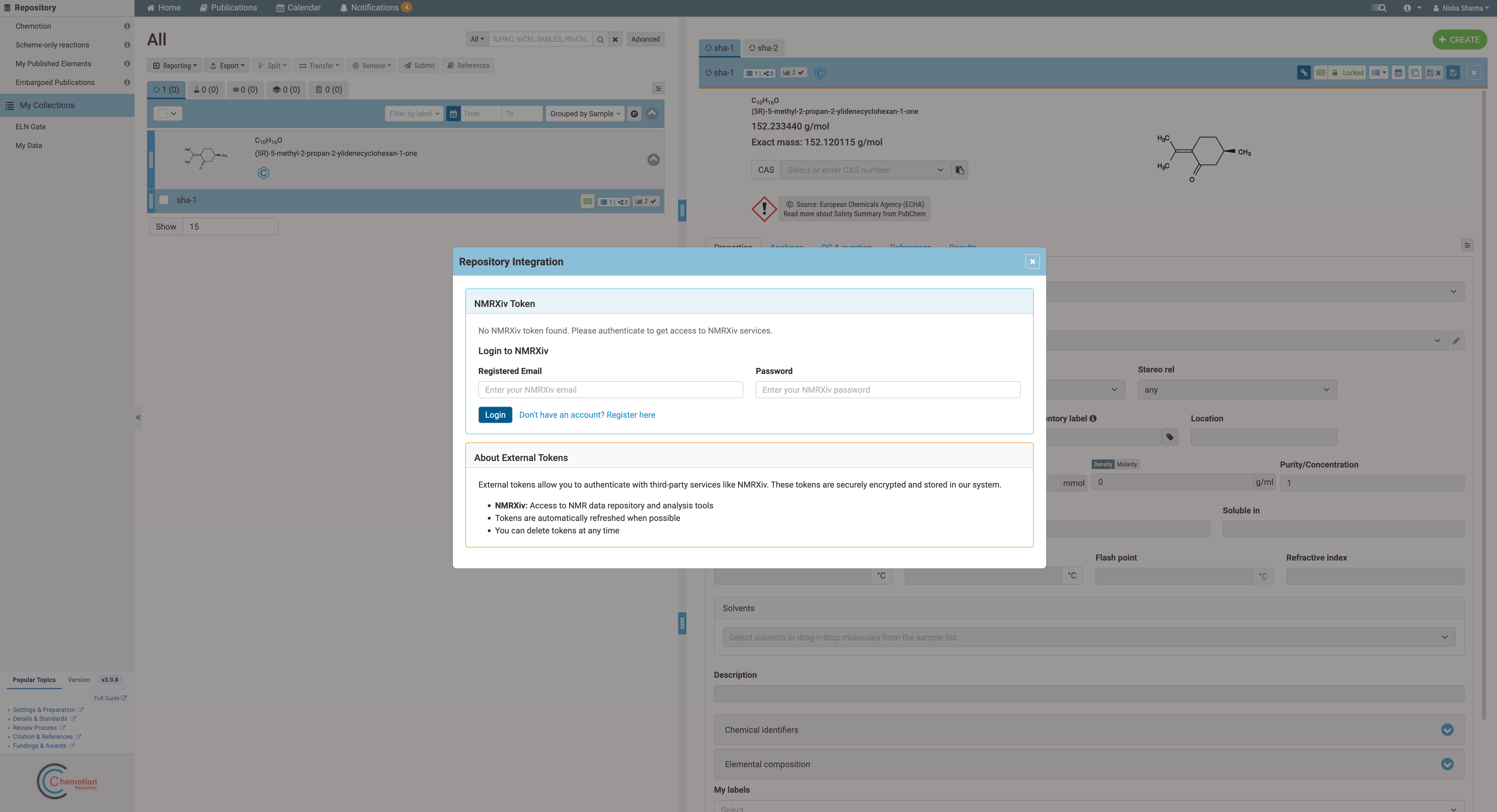
The Repository Integration window opens. Enter the email and password of your nmrXiv account and click Login.
Step 3. No nmrXiv account yet?
Click Don't have an account? Register here in the same window. Fill in the form and click Register.
- First name and last name
- A username
- Your email address
- A password (at least 8 characters), entered twice
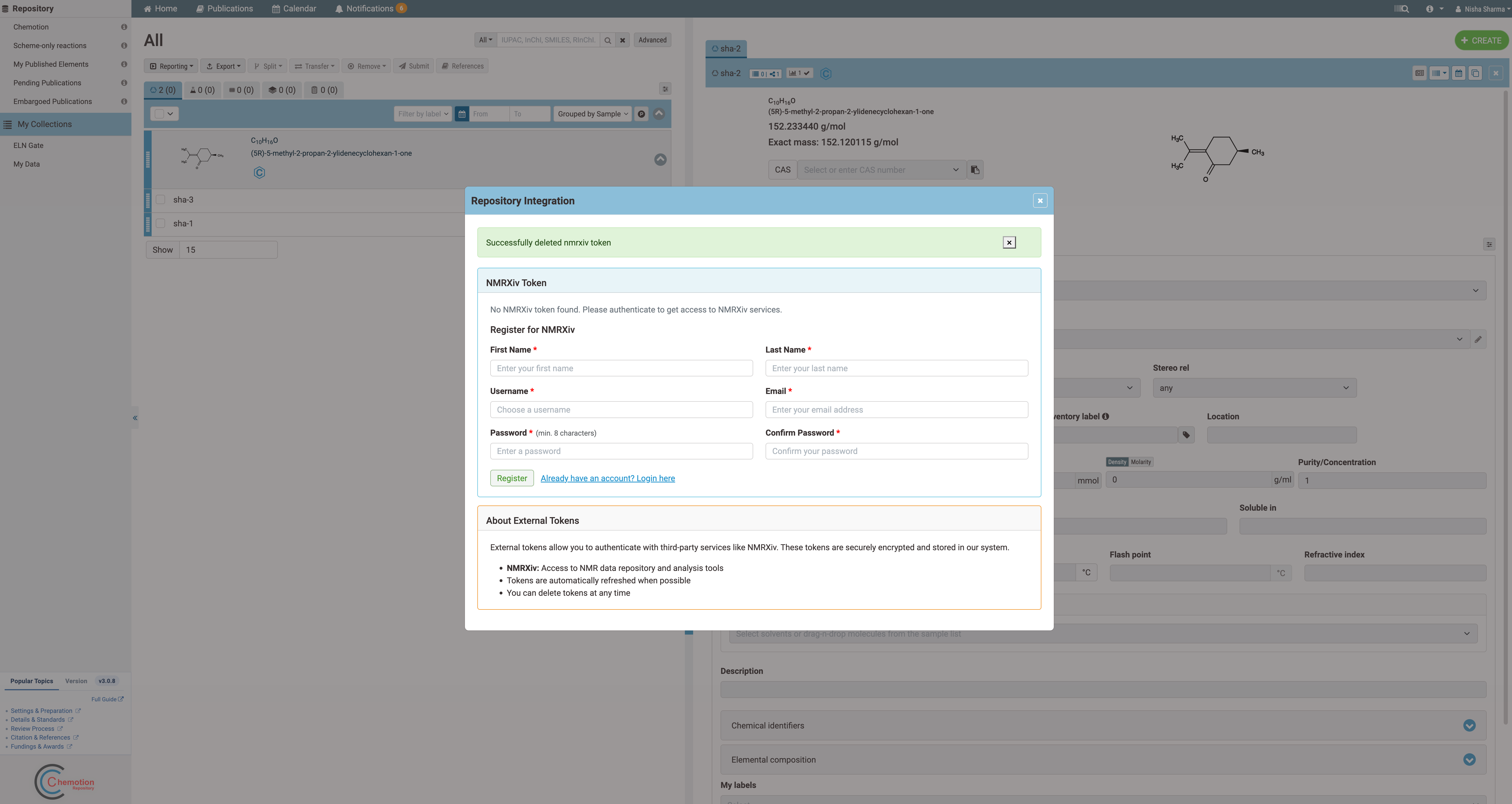
When the account is created, a token is generated for it. If you already have an account, use Already have an account? Login here to go back to the login form.
Step 4. Check that the token is active
After a successful login you see Successfully authenticated with NMRXiv! and the token status Active. You can close the window.
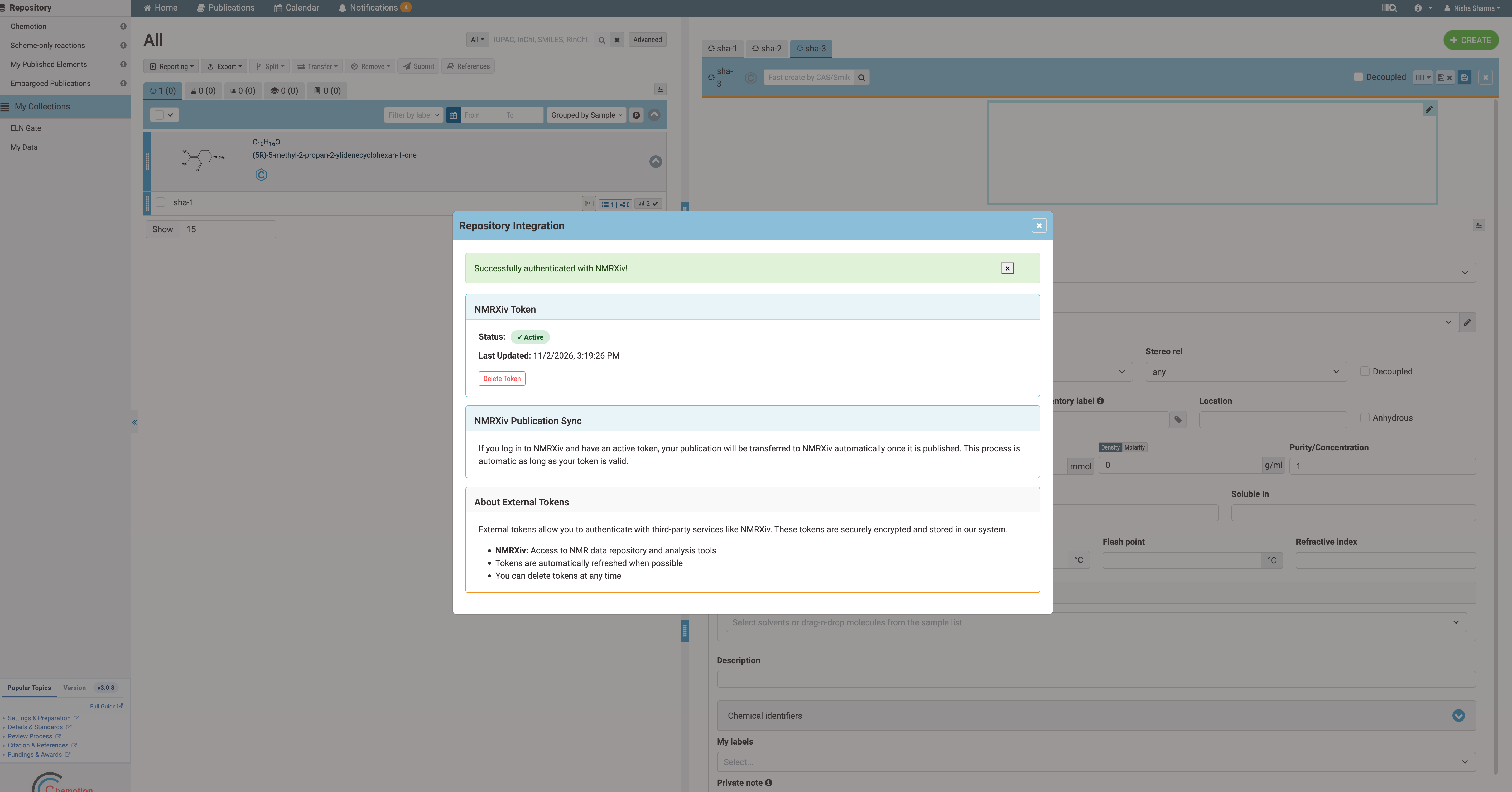
Managing your token
The window also has a Delete Token button. If you delete the token, Chemotion stops sending your data to nmrXiv until you log in again. Tokens are renewed automatically where possible.
Publish in Chemotion
Once your token is active, publish your samples and reactions in Chemotion as you normally would. Choose a license, select the analyses and authors, and click Publish Sample.
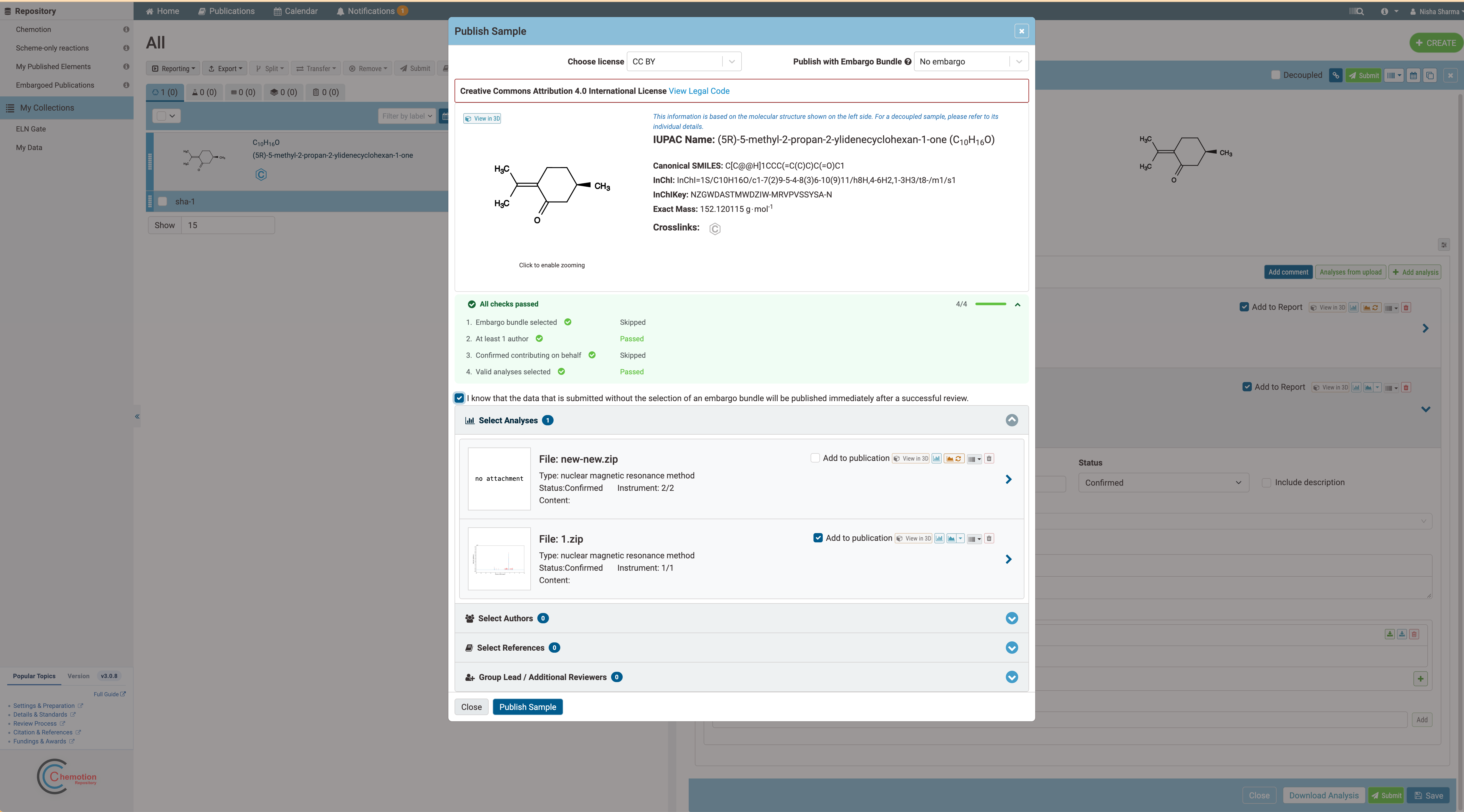
You do not need to do anything in nmrXiv. Every sample and reaction that you publish in Chemotion while your token is active is transferred to nmrXiv automatically.
What Happens After You Submit
- Your submission is received. When you click Publish Sample, Chemotion sends your sample to nmrXiv, which starts processing it automatically. You do not need to keep the page open.
- nmrXiv processes the data. It reads your files and spectra, adds your authors and keywords, and checks that the sample is complete.
- Your sample is published. It becomes publicly visible straight away, gets an nmrXiv identifier (for example
NMRXIV:S1039) and a DOI. Each of its NMR datasets gets its own DOI as well. - You receive an email. The message "Submission Processed" lists your sample and its DOI.
Processing usually takes a few minutes. Large samples with many spectra can take longer.
What your published sample contains
- The authors you entered in Chemotion, with their ORCID iDs where you provided them.
- The keywords and the NMR acquisition details (such as solvent, nucleus, frequency, number of scans and temperature), taken from your data.
- The license you chose, or CC BY 4.0 if you did not choose one.
- A DOI that is registered with DataCite, with you listed as the contact person and nmrXiv as the hosting institution.
You can open your sample at https://nmrxiv.org/sample/S<number> using the identifier from the email.
Things to Know
- Samples are published immediately. Embargo (delayed release) is not available for submissions from Chemotion. Only submit data that you are ready to make public.
- Published data is public and permanent. Once your sample has a DOI, the DOI cannot be removed. Check your data in Chemotion before you submit.
- Submitted twice by mistake? Contact us before submitting again, so that duplicate samples can be avoided.
- Changes after publication (for example a missing author or a wrong license) cannot be made from the Chemotion side. Please contact us with the sample identifier.
If Something Goes Wrong
If nmrXiv cannot finish processing your submission, you receive a single email telling you that the submission could not be completed and at which step it stopped. The nmrXiv team is notified at the same time, so you do not need to report it separately.
Common reasons:
- the file could not be retrieved from Chemotion,
- the sample has no molecule or no processed spectrum,
- the data could not be read.
Fix the data in Chemotion and submit again, or contact us if the cause is not clear to you.
Need Help?
Please reach out to us at info.nmrxiv@uni-jena.de and include:
- the email you received (if any),
- the sample identifier or the Chemotion sample number,
- the date and time of your submission.